
The Best capture card for wii u of 2025 – Reviewed and Top Rated
After hours researching and comparing all models on the market, we find out the Best capture card for wii u of 2025. Check our ranking below.
2,816 Reviews Scanned
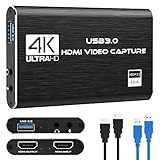
- 【1080P HD High Quality】Capture resolution up to 1080p for video source and it is ideal for all HDMI devices such as PS4, PS3, Xbox One, Xbox 360, Wii U, DVDs, DSLR, Camera, Security Camera and set top box. Note: Video input supports 4K30/60Hz and 1080p120/144Hz. Does not support 4K120Hz/144Hz. Output supports up to 2K30Hz.
- 【Plug and Play】No driver or external power supply required, true PnP. Once plugged in, the device is identified automatically as a webcam. Detect input and adjust output automatically. Won't occupy CPU, optional audio capture. No freeze with correct setting.
- 【Compatible with Multiple Systems】suitable for Windows and Mac OS. High speed USB 3.0 technology and superior low latency technology makes it easier for you to transmit live streaming to Twitch, Youtube, Facebook, Twitter, OBS, Potplayer and VLC.
- 【HDMI LOOP-OUT】Based on the high-speed USB 3.0 technology, it can capture one single channel HD HDMI video signal. There is no delay when you are playing game live.
- 【Support Mic-in for Commentary】Kedok capture card has microphone input and you can use it to add external commentary when playing a game. Please note: it only accepts 3.5mm TRS standard microphone headset.

- 【1080P 60FPS Smooth Capture】Record and stream crystal-clear HDMI video at full HD 1080p 60fps with low latency. Perfect for live gaming, video conferencing, and online teaching
- 【Real-Time HDMI Loop-Out】Play without delay thanks to the HDMI loop-out port, allowing you to enjoy your gameplay on an external display while capturing simultaneously
- 【Support Mic-in for Commentary】Audio capture card has microphone input and you can use it to add external commentary when playing a game. Please note: it only accepts 3.5mm TRS standard microphone headset
- 【Easy to Use & Plug and Play】No need to install any drivers, no need to provide external power, the usb capture card is plug and play, easy to use. You can use any third-party software(OBS) to capture or stream your HD gameplay, or other HD video source
- 【Wide Compatibility】Works with Windows, macOS, and Linux. Compatible with OBS, VLC, Zoom, and more. Compatible with PS4, PS5, Xbox, Switch, DSLR cameras, and set-top boxes
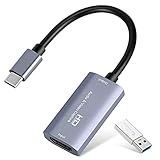
- 【1080P 60FPS Video Capture Card】 This HDMI game capture card is based on USB3.0 high speed transmission port, input resolution up to 4K@30HZ, output resolution up to 2K@30Hz or 1920×1080@60Hz. Type c and USB interface can meet most of the devices in daily life. Easily meet the online capture, real-time recording, online meetings, live gaming and other functions, so you have a better visual enjoyment. Note: For capture use only; requires capture software to function and is not intended for direct screen casting to a monitor or TV
- 【Ultra Low Latency Screen Sharing】 HDMI capture card is made of good quality aluminum alloy with strong heat dissipation, allowing you to enjoy ultra low latency while live gaming or video recording or live streaming, avoiding blue screens and lag. This HDMI to USBC capture card supports easy recording of good quality audio or HD video and transferring it to your computer or streaming platform, allowing you to record 60 fps HD video directly on your hard drive and real-time preview
- 【Plug and Play, Easy to Carry】 This HDMI 1080P video capture card does not require any additional drivers or external power supply, just plug and play for fast capture. The capture card is small and lightweight, so you can put it in your bag for emergencies, making it very portable for outdoor live streaming. It's also a great way to share content in game recording, video conference, video recorder and online teaching
- 【Wide Compatibility USB Capture Card】 Easily streams to Facebook, Youtube or Twitch. With the connection, this HDMI to USB C/3.0 video capture devices can be working on several Operating Systems and various software: Windows 7/ 8/ 10, Mac OS or above, Linux, Android, Laptop, Xbox One, PS3/PS4/PS5, Camera, DVDs, Set Top Box, Webcame, DSLR, Switch/Switch 2, TV BOX, HDTV, Potplayer/VLC, ZOOM, OBS Studio etc.
- 【Package Content & Note】 1x HD Audio Capture Card , 1x USB 3.0 to USB C Adapter (A-side 3.0, B-side 2.0), 1x user manual. Please note that you need to restart the OBS Studio software after the audio setup is complete, otherwise it will result in no sound output. When using an adapter, if the device is recognized as USB 2.0, try using the other side with the USB-C port. Simply flip the capture card and reconnect it to be recognized as USB 3.0
Last update on 2025-08-06 / Affiliate links / Product Titles, Images, Descriptions from Amazon Product Advertising API
How Do You Buy The Best capture card for wii u?
Do you get stressed out thinking about shopping for a great capture card for wii u? Do doubts keep creeping into your mind? We understand, because we’ve already gone through the whole process of researching capture card for wii u, which is why we have assembled a comprehensive list of the greatest capture card for wii u available in the current market. We’ve also come up with a list of questions that you probably have yourself.
We’ve done the best we can with our thoughts and recommendations, but it’s still crucial that you do thorough research on your own for capture card for wii u that you consider buying. Your questions might include the following:
- Is it worth buying an capture card for wii u?
- What benefits are there with buying an capture card for wii u?
- What factors deserve consideration when shopping for an effective capture card for wii u?
- Why is it crucial to invest in any capture card for wii u, much less the best one?
- Which capture card for wii u are good in the current market?
- Where can you find information like this about capture card for wii u?
We’re convinced that you likely have far more questions than just these regarding capture card for wii u, and the only real way to satisfy your need for knowledge is to get information from as many reputable online sources as you possibly can.
Potential sources can include buying guides for capture card for wii u, rating websites, word-of-mouth testimonials, online forums, and product reviews. Thorough and mindful research is crucial to making sure you get your hands on the best-possible capture card for wii u. Make sure that you are only using trustworthy and credible websites and sources.
We provide an capture card for wii u buying guide, and the information is totally objective and authentic. We employ both AI and big data in proofreading the collected information. How did we create this buying guide? We did it using a custom-created selection of algorithms that lets us manifest a top-10 list of the best available capture card for wii u currently available on the market.
This technology we use to assemble our list depends on a variety of factors, including but not limited to the following:
- Brand Value: Every brand of capture card for wii u has a value all its own. Most brands offer some sort of unique selling proposition that’s supposed to bring something different to the table than their competitors.
- Features: What bells and whistles matter for an capture card for wii u?
- Specifications: How powerful they are can be measured.
- Product Value: This simply is how much bang for the buck you get from your capture card for wii u.
- Customer Ratings: Number ratings grade capture card for wii u objectively.
- Customer Reviews: Closely related to ratings, these paragraphs give you first-hand and detailed information from real-world users about their capture card for wii u.
- Product Quality: You don’t always get what you pay for with an capture card for wii u, sometimes less, and sometimes more.
- Product Reliability: How sturdy and durable an capture card for wii u is should be an indication of how long it will work out for you.
We always remember that maintaining capture card for wii u information to stay current is a top priority, which is why we are constantly updating our websites. Learn more about us using online sources.
If you think that anything we present here regarding capture card for wii u is irrelevant, incorrect, misleading, or erroneous, then please let us know promptly! We’re here for you all the time. Contact us here. Or You can read more about us to see our vision.
FAQ:
Q: Can you record Wii U gameplay with a PC?
A: Since there is no built-in screen recording tool in the Wii U device, you need to find other ways to capture Wii U gameplay. For example, you can connect your Wii U game console to the PC with an HDMI cable and capture card, and then you can use a screen recording software on the computer to easily record the Wii U gameplay.
Q: What is the best video game capture card?
A: Best Game Capture Cards for Xbox One in 2019 Best for 4K: Avermedia Live Gamer 4K 4K passthough: Razer Ripsaw HD Lag free: Elgato HD60S Console king: Elgato HD60 Pro Capture and stream: Elgato 4K60 Pro External 4K: AVerMedia Live Gamer Ultra Driver-free: AVerMedia Live Gamer HD2
Q: What is a PlayStation capture card?
A: Capture cards are for capturing external devices via video signals usually though HDMI. This allows capture of consoles like Xbox and Playstation. However a capture card is not necessary for pc gaming as you can already directly capture it using obs or xsplit.
Q: What is a capture card?
A: A capture card is a receiver, either external or internal, to input data- they are used to transfer video & audio signals from one device to another. This is particularly useful if you are using two PCs, one to stream on and one to game on. The signal goes from the GPU on your gaming PC to the capture card connected…
Related Post:
- Wii U Capture Card
- wii u capture card
- wii u capture card cheap
- nintendo wii console black with wii sports and wii sports resort
- avermedia live gamer hd 1080p capture and streaming hardware encoder card
- Composite Capture Card
- 60Fps Capture Card
- 4k 60fps capture card
- Pci Capture Card
- Capture Card For Xbox One